
Finley Document Styling
Set your preferred document font and colours, check your adviser details and add practice branding. Review a fresh export to confirm the result for the document type you use.
Before you start
Sign in to your own account and have the practice-approved colours, logo or letterhead available if you intend to change them.
Use a demonstration or non-sensitive draft to check the exported appearance.
1. Open your preferences
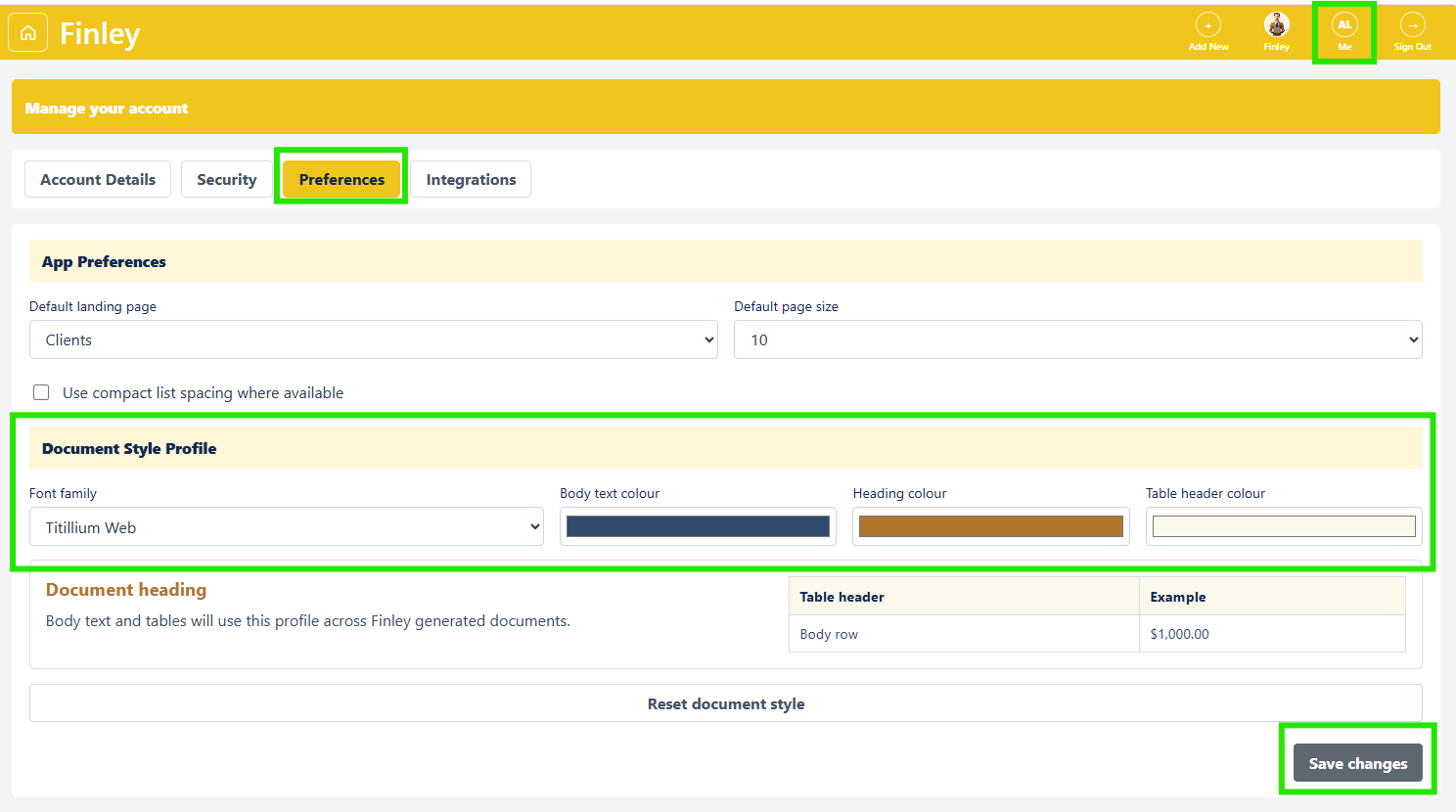
Choose Me in the top bar, then Preferences. Under Document Style Profile, you can set Font family, Body text colour, Heading colour and Table header colour. These controls set the reusable document-style preference for your account.
2. Choose a readable style
Pick a font from the available list: Titillium Web, Calibri, Arial, Georgia, Times New Roman or Verdana. Set the three colours and use the on-screen heading, paragraph and table preview to check the combination. Make sure text remains easy to read. If you want to start again, select Reset document style and review the defaults before saving.
3. Save and confirm
Select Save changes at the bottom of the page and wait for the result. The preview alone does not confirm the settings were saved. If an error appears, check the message before navigating away. Return to Preferences and verify the values you intended to keep.
4. Check the details used in documents
Open Account Details. Review your Full name, contact details, ASIC Adviser Number, practice information and address. The Practice Details section also lets you choose a Profile photo, Practice logo and Practice letterhead image. Check each preview, then select Save changes. Use accurate, approved details and branding; do not change another person’s assignment or permissions to solve a formatting problem.
5. Review a newly prepared document
Return to Finley, prepare a short draft and download it as Word. Check headings, body text, tables and any branding or merged identity fields. A browser preview is a flowing document view, so inspect the actual Word layout as well. Check a separate sample for each important template type your practice uses. Retain the approved version through your usual document process.
6. Adjust the app separately if helpful
The same Preferences page has Default landing page, Default page size and Use compact list spacing where available. Choose the values you prefer and save them. Team Management is a separate area showing colleagues’ roles, status and app access. Changes there should be handled through your authorised administration process, not as part of document styling.
Check before you finish
Verify that the saved preference remains when you revisit the page.
Check the correct assigned adviser, practice and licensee in each client document; your signed-in details are not a substitute for checking the client’s assignment.
Confirm a fresh Word export before assuming an existing downloaded document has changed.
If something does not work
If a particular template does not match the style preview, keep the example and raise a support ticket with the document type and expected result.
If Save changes reports a preferences error after other profile changes, revisit both sections and verify their values rather than assuming the whole save was rolled back.
If you cannot change a role or access setting, ask the authorised administrator; the presence of a field does not establish permission.